Catch leads
New leads hear back in seconds
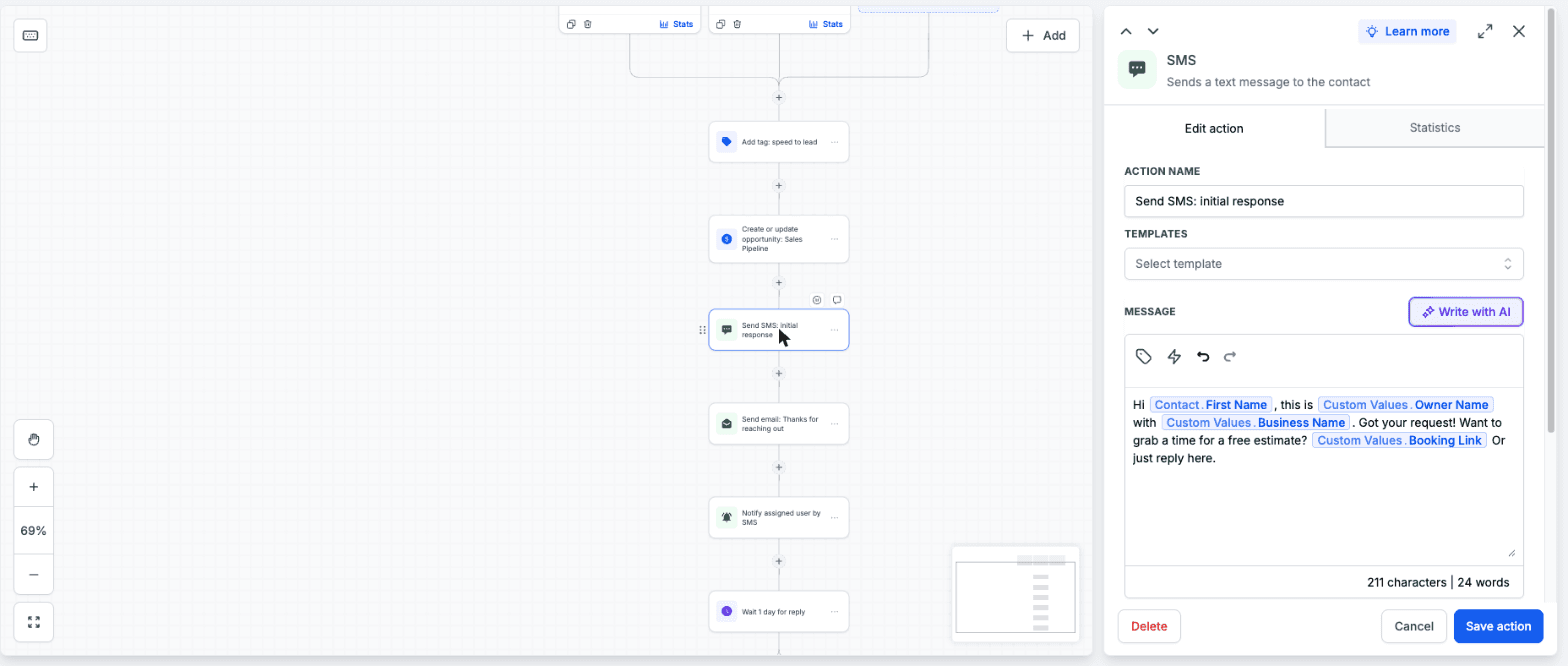
Someone fills out your quote form and gets a text and an email right away. You get an alert, a deal opens in your pipeline, and it follows up on day 1, 3 and 7 until they answer.
Built for HighLevel
Load it into HighLevel, the all-in-one CRM, and every lead gets a text back, every quote gets chased and every finished job asks for a review.
Free for everyone. Runs inside your HighLevel account.
What happens when a quote request comes in
They get a text back right away
Example. You edit the wording.
You get an alert with their details
And a new deal lands in your pipeline.
No reply? It follows up for you
Day 1, 3 and 7, and it stops when they answer.
Everything you get
You don't start from a blank account. Here is every piece that loads in, and what it does for you while you're on the job.
Catch leads
Someone fills out your quote form and gets a text and an email right away. You get an alert, a deal opens in your pipeline, and it follows up on day 1, 3 and 7 until they answer.
Catch leads
You're on a roof and the phone rings. They get a text saying sorry we missed you, with your booking link, before they call the next company.
Example. You edit the wording.
Win the job
Move a job to Quote Sent and it nudges the customer for you. The moment they reply, it stops.
Example. You edit the wording.
Grow
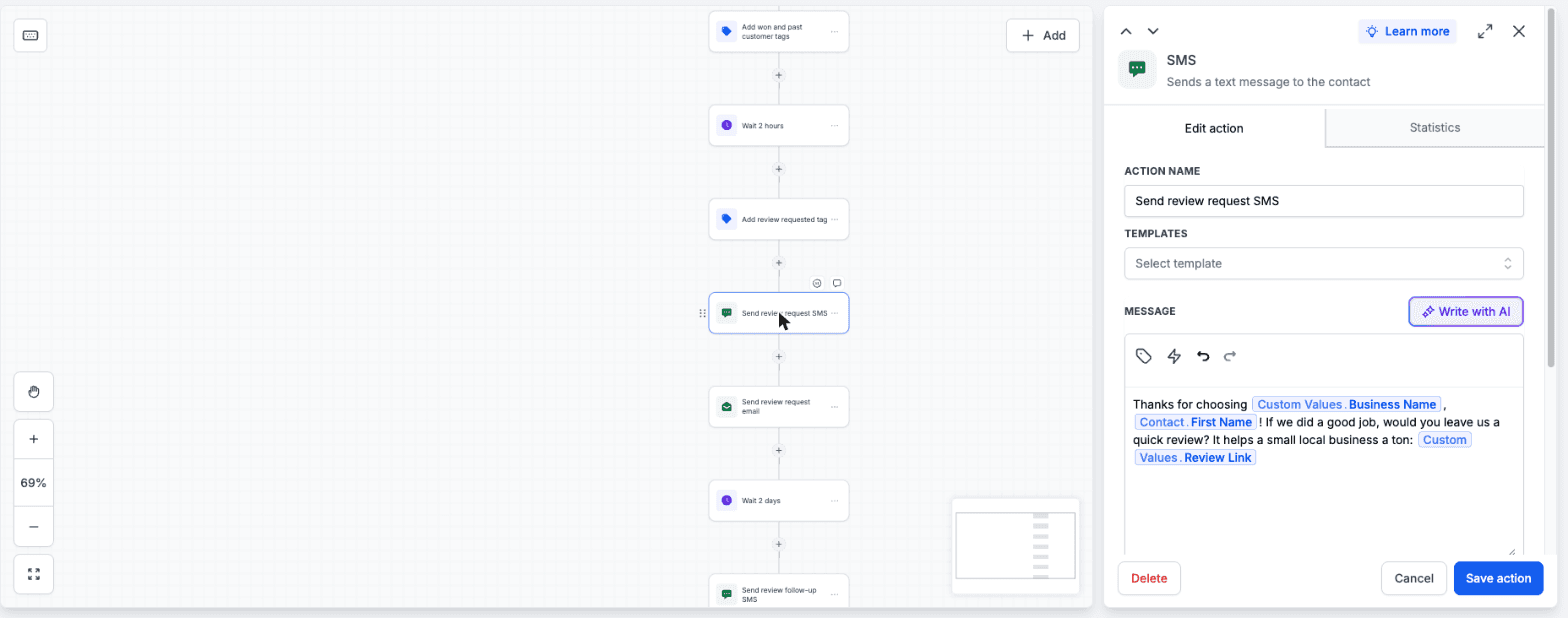
Mark a job Won and the customer gets a review ask by text and email, plus one reminder two days later. No more forgetting to ask at the door.
Win the job
A confirmation by text and email the moment they book, then reminders 24 hours and 2 hours before.
Grow
Tag your old customers and a win-back campaign goes out. Anyone who replies gets booked onto your calendar.
Example. You edit the wording.
Win the job
A Free Estimate calendar they can book online, day or night, without a phone call.
Win the job
New Lead, Contacted, Estimate Booked, Quote Sent, Won, Lost. Move a card to Quote Sent or Won and the right follow-up starts on its own.

Catch leads
Name, phone, email, service needed, address, preferred time and notes, with text-consent boxes built in. Every submission kicks off the speed-to-lead texts.
Set up once
Six emails in plain, local language, pulling in your business details automatically.
Set up once
Custom fields on every contact, so you know what they want and where before you call back.
Set up once
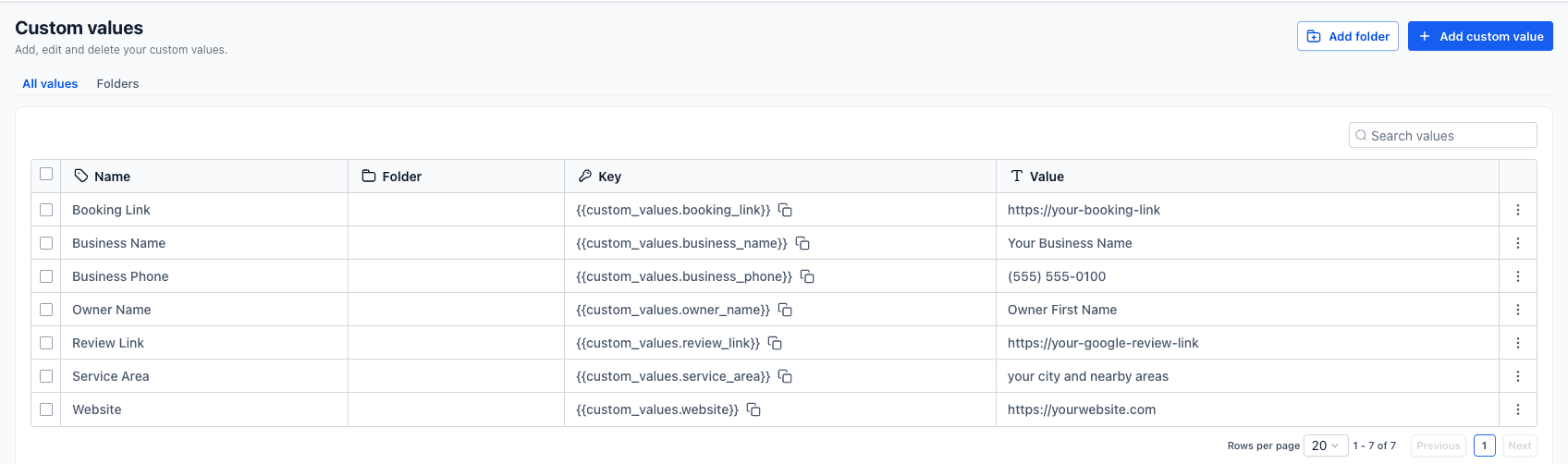
Business name, owner name, phone, booking link, review link and service area live in one place. Change one and every text and email changes with it.
Ready in your account
Nothing texts anyone until you add your details and turn them on. Then they run on their own.
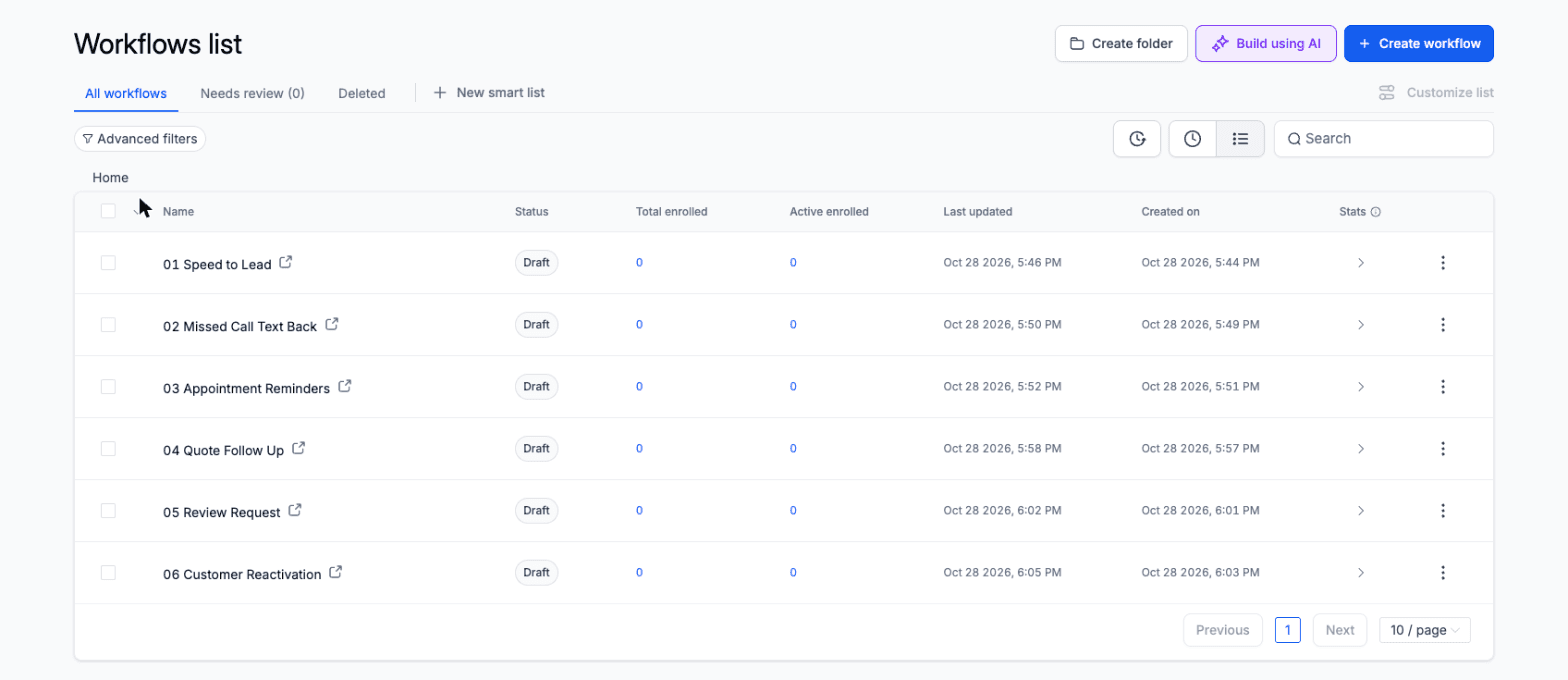
All twelve pieces arrive in one link. Free.
Load it, add your details, switch it on. About 30 minutes with the guide.
New to HighLevel? Here's what it is
HighLevel is one app for your leads, texts, calls, email, calendar, pipeline and reviews, so it can replace several tools you might be juggling now.
Affiliate link: if you sign up for HighLevel through it, All For One Web Designs earns a commission from HighLevel. It costs you nothing extra, and the snapshot is free either way.
Already on HighLevel? Get the snapshot free.
A homeowner fills out a few quote forms and books whoever gets back first. If you're on a roof or under a house, that isn't you.
You send the price, they say they'll think about it, and nobody follows up. That job was half won.
Most of them would. Nobody asked at the right moment, so your best work never shows up on Google.
About 30 minutes from link to live, once your phone number and email are connected.
Tell us where to send it. Free for everyone, new to HighLevel or not.
Your snapshot link and setup guide land on screen and in your inbox right away.
Business name, phone, booking link, review link and service area. Once.
Turn on the workflows, send yourself a test lead, and watch it reply.
Want to see every step first? Read the setup guide.
The snapshot does the follow-up. A few things only you can do, and we'd rather tell you now than after you load it.
Have a HighLevel account
The snapshot runs inside it. If you don't have one yet, you can start one on HighLevel's site.
Connect your phone number and email
So texts and emails go out from your business.
Register for business texting (A2P)
Carriers require it before you text customers. Approval runs on the carriers' timeline, not ours.
Fill in your custom values
Your business name, phone, booking link, review link and service area.
Know the usage fees
Texts, calls and AI features are billed by HighLevel at their own rates.
No catch and no conditions. It runs inside HighLevel, so you need an account to load it.
Claim it and load it into your account today. Your snapshot link and setup guide arrive right away.
Claim it the same way. You'll need a HighLevel account to load it (plans start at $97/month, billed by HighLevel), and the claim page has a link to start one if you want it.
A snapshot is a saved copy of a HighLevel account setup: pipelines, workflows, forms, calendars, templates and settings. You open the share link while logged in to your agency account and it loads everything into a sub-account for you.
HighLevel is one app for your leads, texts, calls, email, calendar, pipeline and reviews, so it can replace several tools. The snapshot loads into it. HighLevel plans start at $97/month, billed by HighLevel. The snapshot is free.
Yes. The snapshot runs inside HighLevel, so you need your own account to load it. If you don't have one, the claim page has our link to start one. That's an affiliate link: we earn a commission if you sign up through it. The snapshot is free either way, with or without our link.
The goal is under 30 minutes to load it, fill in your details and switch it on, with a step-by-step guide and video. Carrier approval for business texting (A2P) can take longer, and that part is out of our hands.
It's written for local home-service businesses: pool, sprinkler and irrigation, HVAC, cleaning, landscaping, roofing, pest control and handyman work. The wording is general, and you can edit any message in one place.
Yes, for everyone, whether you're new to HighLevel or have used it for years. There's nothing to buy from us and no monthly fee. You pay HighLevel for your own plan, and HighLevel bills texts, calls and AI features at its own usage rates.
You can, but we recommend a fresh sub-account so nothing you've already built gets mixed up or overwritten. The setup guide covers both.
Only the people who contact you, book with you or get tagged by you. Every message is visible and editable before you turn the workflows on.
All For One Web Designs, LLC, a web design and marketing agency that builds these systems for local businesses. We're not affiliated with or endorsed by HighLevel.